Agent Grants: Scoped, Time-Limited Credential Access
Create agent identities with tvagent_ API keys and grant them scoped, time-limited access to specific credentials — revocable instantly from the dashboard.
Token Vault provides scoped, time-limited credential access for AI agents, external scripts, and ADK agents.
Creating an Agent
- Go to the Agents tab and click "Create Agent".
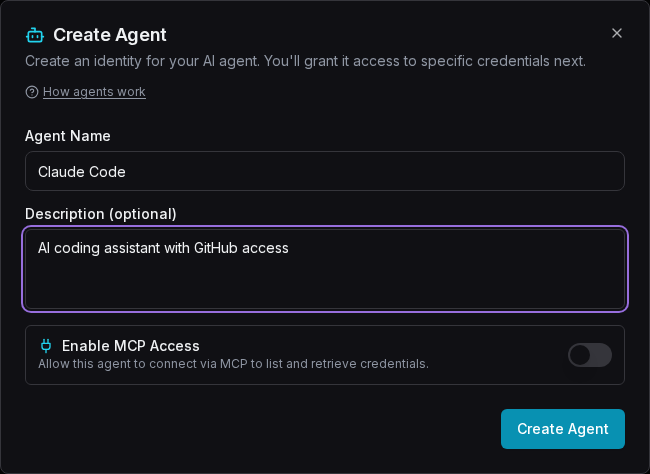
- Give it a name (e.g., "Claude Code") and optional description.
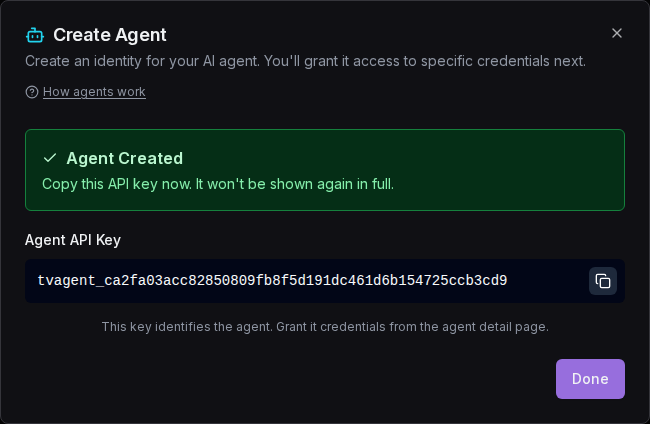
- Copy the generated API key (
tvagent_...). It is shown only once.
Fill in the agent name and description in the create dialog:
After clicking "Create Agent", the success screen shows your API key. Copy it now for convenience — or don't: you can retrieve it later from the agent's detail page with Reveal (an audited action):
Granting Credentials
- Open the agent's detail page and click "Grant".
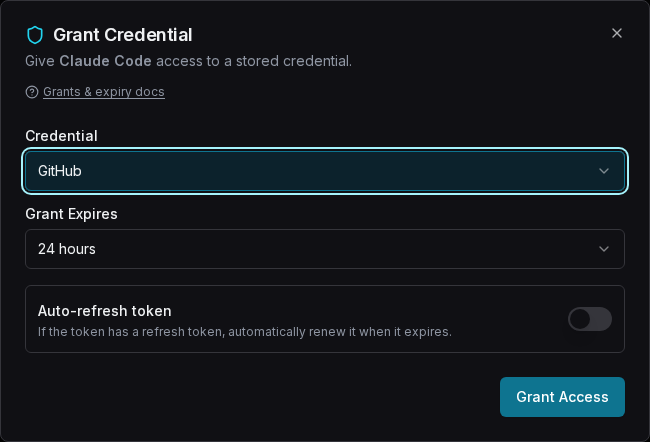
- Select which vault token the agent can access.
- Set an expiry (1 hour to 30 days, or "Until revoked").
- Optionally enable auto-refresh for OAuth tokens.
Grants without custody
Grants can be created without Token Vault verifying credential presence. Your webhook owns the storage and Token Vault trusts it to hold the credential. Token Vault never accesses the credential during grant creation.
The grant dialog lets you pick a credential and set the access window:
Agent Credential Retrieval
Your agent calls the HTTP endpoint with its API key:
# Get a specific credential
GET /api/agents/credentials?service=github
Authorization: Bearer tvagent_abc123...

# List all available grants
GET /api/agents/credentials
Authorization: Bearer tvagent_abc123...
Auth can also be passed via the x-agent-key header. A ?key= query parameter is
not accepted — a key in a URL lands in server logs, proxy logs and browser history.
Direct-From-Webhook Credential Retrieval
Token Vault never sees your plaintext credentials during agent access. When an agent requests a credential:
- The agent sends
GET /api/agents/credentials?service=githubto Token Vault. - Token Vault validates the agent's API key, checks the grant, and evaluates ABAC policies.
- Token Vault generates a signed credential ticket (HMAC-SHA256) and returns a 307 redirect to your webhook's
/v1/credentialendpoint. - The agent's HTTP client follows the redirect and receives the credential directly from your webhook.
- Your webhook verifies the ticket signature, reads the credential from its own storage, and returns it.
Token Vault acts as a policy gate: it decides whether the agent can access the credential, but never touches the credential itself. The Authorization header is stripped on cross-domain redirects, so your webhook authenticates via the signed ticket, not the agent key.
Revocation
Grant Expiry & Revocation
Grants expire automatically after the set duration. You can also revoke any grant immediately from the agent's detail page. The agent will get an error on its next request.
MCP Service Endpoint
Agents with MCP enabled can connect as a native MCP server using the
standard Streamable HTTP transport. This lets AI agents use tools/call to list and
retrieve credentials via JSON-RPC -- no custom HTTP integration needed.
Connecting via MCP
Two interchangeable ways to authenticate — both resolve to the same (user, agent)
identity with the same grants and policies:
OAuth 2.1 (recommended for MCP clients). Point the client at the endpoint with no credentials; it discovers Token Vault's authorization server and walks you through consent in the browser:
claude mcp add --transport http token-vault https://api.tokenvault.uk/api/agents/mcpNo key handling at all — see OAuth 2.1 for MCP Clients.
Static tvagent_ key. For server-side agents you configure by hand:
{
  "mcpServers": {
    "tokenvault": {
      "url": "https://api.tokenvault.uk/api/agents/mcp",
      "headers": {
        "Authorization": "Bearer tvagent_abc123..."
      }
    }
  }
}
Either way, enable MCP access for the agent first (toggle "MCP Enabled" on the agent detail page — or approve it inline during the OAuth consent step).
Available MCP Tools
list_credentials
Lists all credentials the agent has been granted access to. Returns service names, expiry times, and refresh policies. Takes no parameters.
// Request
{
  "jsonrpc": "2.0", "id": 1,
  "method": "tools/call",
  "params": {
    "name": "list_credentials",
    "arguments": {}
  }
}

// Response
{
  "jsonrpc": "2.0", "id": 1,
  "result": {
    "content": [{
      "type": "text",
      "text": "Available credentials (2):\n  - github (expires: Never, refresh: none)\n  - google (expires: 2026-08-20T12:00:00+00:00, refresh: auto)"
    }]
  }
}
get_credential
Retrieves an access token for a specific service. The agent must have an active grant.
// Request
{
  "jsonrpc": "2.0", "id": 2,
  "method": "tools/call",
  "params": {
    "name": "get_credential",
    "arguments": { "service": "github" }
  }
}

// Response
{
  "jsonrpc": "2.0", "id": 2,
  "result": {
    "content": [{
      "type": "text",
      "text": "Access token for github:\nghp_abc123...\n\nToken type: pat\nScope: repo,read:org\nGrant expires: Never"
    }]
  }
}
MCP without custody
The get_credential MCP tool returns a signed credential URL instead of the credential itself. The agent fetches the credential directly from your webhook using this URL. Token Vault never handles the credential. It only validates the agent's grants and policies before issuing the signed URL.
MCP vs REST: Which to use?
MCP endpoint (POST /api/agents/mcp) -- Use when your agent natively supports MCP (Claude, Cursor, etc.). The agent discovers available tools automatically via the MCP protocol.
REST endpoint (GET /api/agents/credentials) -- Use for scripts, custom integrations, or agents that don't support MCP. Simpler HTTP GET with the API key in the Authorization header.
Both endpoints use the same grants and policies -- they are two interfaces to the same credential access system.
Access Policies
For fine-grained control beyond expiry, attach access policies to your agents. Policies let you restrict access by time of day, IP address, geographic location, rate limits, and lifetime usage caps. When a policy is attached to an agent, every credential request is evaluated against all rules before the credential is returned.
See the full Access Policies documentation for details.
Ready to try it?
Sign up free with Google — your credentials stay on your own webhook, and the quickstart gets an agent fetching its first credential in about ten minutes.
How to Give Claude Secure Access to Your API Keys
Three ways to let Claude Code and Claude.ai use your API keys and OAuth tokens without pasting secrets into config files — OAuth 2.1 MCP, credential fetch, and the MCP proxy.
MCP Proxy: Secure AI Agent Connections
Point Cursor, Claude, or any MCP client at a Token Vault proxy URL — your webhook injects the real credential server-side, so the agent never sees it.