Webhook Mode: Full Data Sovereignty with Kill Switch
Full data sovereignty with webhook-owned encryption, a kill switch, and credentials stored on your own server.
Webhook Mode gives you full control over your credential storage and encryption. Your credentials are stored on your own server via the webhook, encrypted with an AES-256-GCM key that your webhook owns. Token Vault never holds any encryption key material and never sees plaintext credentials. It acts as a metadata, policy, and agent authorization service only.
How It Works
- Storing credentials: your browser sends credentials directly to your webhook's
/v1/storeendpoint with a signed ticket. Token Vault issues the ticket but never sees the credential. - Agent access: Token Vault validates the agent's API key and policies, then returns a 307 redirect to your webhook's
/v1/credentialendpoint. The agent follows the redirect and gets the credential directly. Token Vault never touches it. - MCP proxy: Token Vault forwards the proxy request to your webhook's
/v1/proxyendpoint. Your webhook decrypts the credential, injects it into the upstream request, and returns the response. - Metadata only: Token Vault uses
/v1/storagefor non-credential operations: listing token metadata, managing proxy configs, writing audit events. No plaintext credentials flow through this endpoint.
Configuration
| Setting | Value |
|---|---|
| Storage | Your webhook server (via /v1/storage protocol) |
| Encryption | Webhook-owned AES-256-GCM key |
| Token Refresh | Notify-only, TV-mediated, or webhook-autonomous (your choice) |
| Kill Switch | Yes |
| Zero-Knowledge | Yes (TV-mediated refresh briefly handles credentials in transit, if opted in -- never stored) |
| TV Static IP | 34.12.35.243 (for IP whitelisting) |
The Kill Switch
Taking your webhook offline instantly cuts off all access to your credentials. This is the emergency revocation mechanism.
When your webhook is offline:
- Token Vault cannot decrypt anything because your webhook owns the key.
- All agent credential requests return 503.
- All MCP proxy requests return 503.
- Token refresh stops.
- No one can access your credentials until the webhook comes back online.
Setup
1. Deploy a webhook server
Your webhook must implement the webhook integration, which consists of eight endpoints in two categories:
Token Vault → Webhook (HMAC-signed):
| Endpoint | Purpose |
|---|---|
POST /v1/exchange | One-time code exchange to establish HMAC secret |
GET|POST /v1/health | Health check (GET unauthenticated, POST HMAC-signed) |
POST /v1/storage | Metadata operations: token listings, proxy configs, audit events, batch listing |
POST /v1/proxy | MCP proxy: decrypt credential, inject into upstream request |
POST /v1/refresh-notify | Token refresh notification (webhook handles refresh) |
POST /v1/refresh | TV-mediated refresh: two-phase get/update (opt-in via tv-refresh capability) |
Direct access (called by agents/browsers, not Token Vault):
| Endpoint | Purpose |
|---|---|
GET /v1/credential | Agent credential access via 307 redirect with signed ticket |
POST /v1/store | Browser-direct credential storage with signed ticket |
An example webhook implementation is available in the tvault examples repo. It runs locally and exposes itself via ngrok.
2. Open the webhook's bind page
Your webhook serves a /bind page that generates a one-time registration link. Visit it in your browser:
https://your-webhook.example.com/bindThe bind page shows your webhook's external URL and a "Connect to TokenVault" button.
3. Click "Connect to TokenVault"
The button redirects you to Token Vault's /vault/webhook-bind page with three URL parameters:
code- a one-time exchange code (UUID, 5-minute TTL)webhook_url- your webhook's URL (base64-encoded)hmac_hash- SHA-256 hash of the webhook's HMAC secret (for tamper detection)
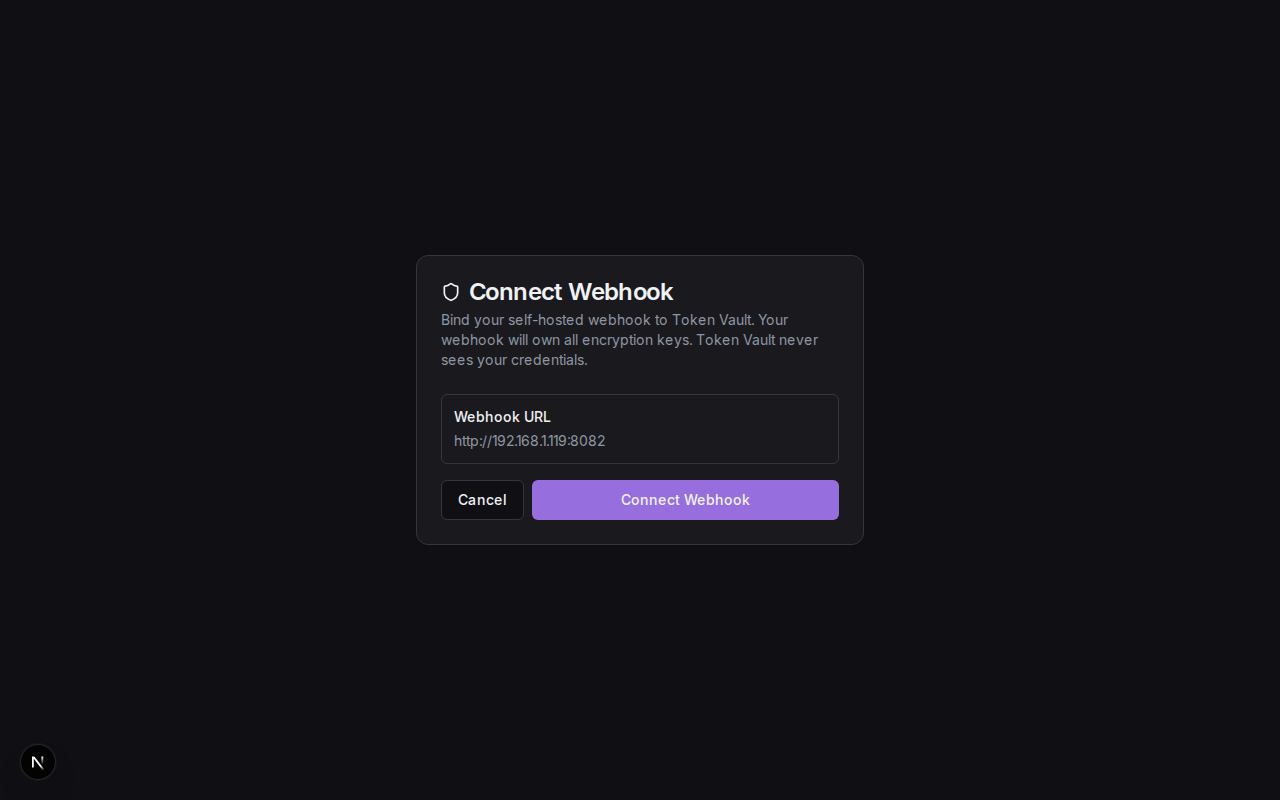
4. Confirm the binding
On the Token Vault bind page, review the webhook URL and click Connect. Token Vault calls your webhook's /v1/exchange endpoint with the one-time code, receives the HMAC secret, and stores the webhook configuration.
5. Start using your vault
Once bound, your vault is ready. Tokens you add from this point are sent to your webhook for encrypted storage.
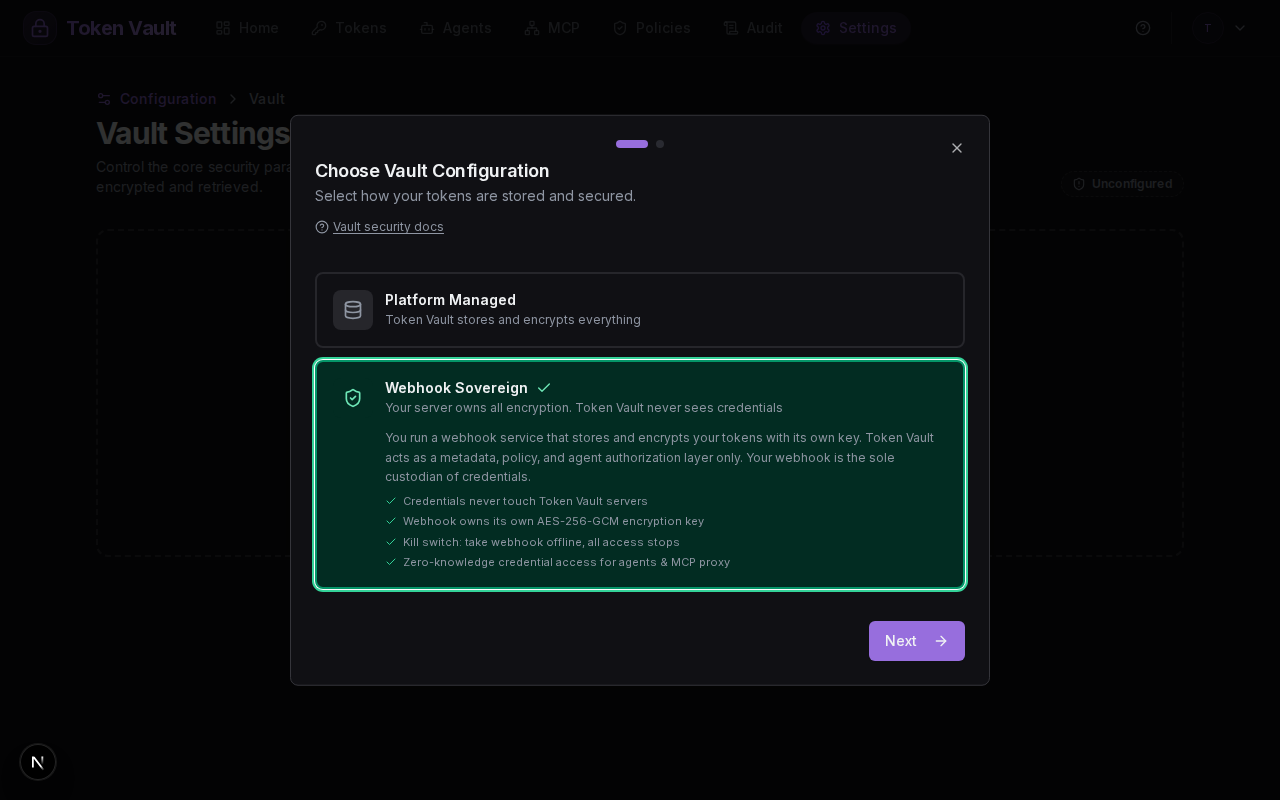
In the setup wizard, you can also reach Webhook Mode by selecting "Webhook Sovereign":
HMAC authentication
After the initial code exchange, every request from Token Vault to your webhook is signed with HMAC-SHA256. Your webhook must verify the signature before processing any request. See the webhook authentication docs for details.
Refresh Options
You choose how expired OAuth tokens are refreshed:
Notify-Only Refresh (/v1/refresh-notify)
Token Vault detects expiring tokens and notifies your webhook via /v1/refresh-notify. Your webhook reads the encrypted token from its storage, decrypts the refresh token, calls the OAuth provider using its own client credentials, encrypts the result, and stores it back. Token Vault sends provider hints (token URL, client ID) but never the credential or clientSecret. Fully zero-knowledge.
TV-Mediated Refresh (/v1/refresh)
For Token Vault's built-in OAuth providers (Google, GitHub), your webhook can opt in to TV-mediated refresh by reporting the "tv-refresh" capability. Token Vault retrieves the decrypted refresh token from your webhook, performs the OAuth refresh using its own client_secret, and sends the new tokens back for your webhook to encrypt. This is the only flow where Token Vault briefly handles credential material in transit -- it is never stored. Runs automatically (tokens expiring within 1 hour are refreshed).
Webhook-Autonomous Refresh
Your webhook handles the entire refresh cycle autonomously. Token Vault sends a notification but your webhook manages the scheduling and execution of refreshes independently. This option gives you complete control over the refresh lifecycle.
Zero-Knowledge Agent Access
In Webhook Mode, agents and the MCP service access credentials without Token Vault ever handling them:
- Grant creation: Agents can be granted access to tokens without Token Vault verifying credential presence, since your webhook owns the storage, Token Vault trusts the webhook to hold the credential.
- MCP
get_credentialtool: In Webhook Mode, the MCP service returns a signed credential URL instead of the credential itself. The agent fetches the credential directly from your webhook using this URL. - REST endpoint: Returns a 307 redirect with a signed ticket. The agent follows the redirect to your webhook's
/v1/credentialendpoint.
When to Use Webhook Mode
Webhook Mode is right for you if...
- You need full data sovereignty, where credentials never leave your infrastructure in plaintext.
- You need a kill switch for instant emergency revocation.
- Compliance requirements prevent storing credentials on third-party platforms.
- You want zero-knowledge operation where Token Vault never sees your credential data.
Troubleshooting
Vault Modes
Token Vault is webhook-sovereign. Credentials live on your self-hosted webhook server. Token Vault acts as the policy and identity plane only.
AES-256-GCM Encryption & Zero-Knowledge Security
How Token Vault's webhook-sovereign architecture keeps your encryption key on your infrastructure. Token Vault never holds or sees your AES-256-GCM key.