Platform Mode
Token Vault manages storage, encryption, and refresh - zero config, fully managed credential security.
Platform Mode is the simplest way to use Token Vault. Your credentials are stored by Token Vault, encrypted with an AES-256-GCM key that Token Vault holds, and automatically refreshed when they expire. There is nothing to deploy and nothing to maintain.
How It Works
- You store a credential through the dashboard or OAuth flow.
- Token Vault encrypts it with AES-256-GCM using a platform-managed key.
- The encrypted credential is persisted by Token Vault.
- When an agent or MCP proxy requests the credential, Token Vault decrypts it and returns the plaintext over TLS.
- OAuth tokens are automatically refreshed when they expire.
Setup
- Sign in at tokenvault.uk/login.
- Open Settings > Vault.
- Click Setup Wizard and select Platform Mode.
- Confirm - your vault is ready.
In the setup wizard, select "Platform Managed" to proceed:
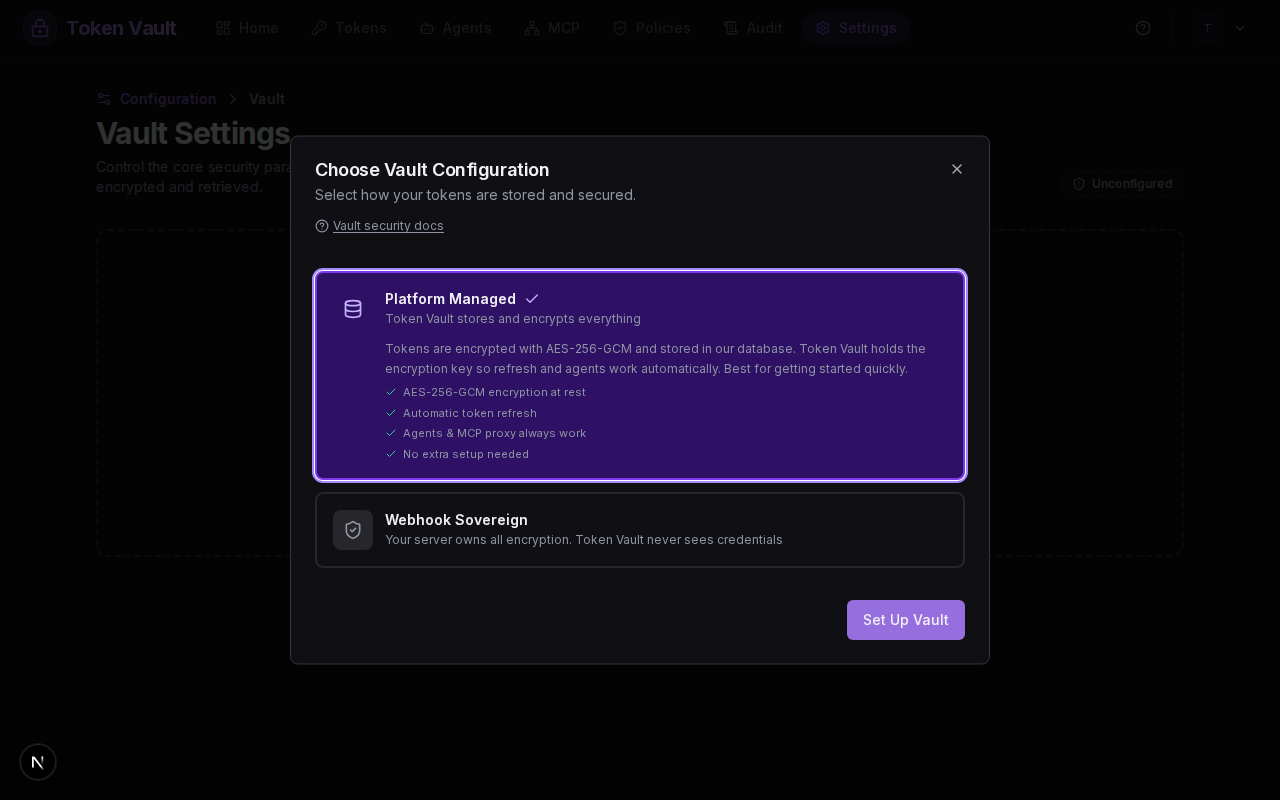
Tokens you add from this point are encrypted with the platform key and stored by Token Vault.
Configuration
| Setting | Value |
|---|---|
| Storage | Managed by Token Vault |
| Encryption | Platform Key (AES-256-GCM) |
| Token Refresh | Server (Token Vault handles refresh) |
| Kill Switch | No |
Security Properties
- Encrypted at rest - all credentials are encrypted with AES-256-GCM before being written to storage. They are never stored in plaintext. Each credential is encrypted with a unique nonce (12-byte random IV) to ensure ciphertext is never repeated.
- Token Vault can decrypt - because Token Vault holds the encryption key, it can decrypt your credentials on demand. This is the trade-off for zero-config simplicity: you trust Token Vault as a platform.
- Automatic refresh - OAuth tokens (GitHub, Google) are refreshed server-side when they expire. Agents never encounter expired credentials.
- No webhook required - there is no external dependency. Everything runs within Token Vault's infrastructure.
- TLS in transit - all communication between your browser and Token Vault uses TLS. Decrypted credentials are only returned over encrypted connections.
What Happens Under the Hood
When you set up Platform Mode, the following key lifecycle runs:
- Key generation - a 256-bit AES key is generated server-side using a cryptographically secure random number generator.
- Key storage - the key is persisted securely server-side, accessible only by Token Vault's backend service account.
- Encrypt on write - when you store a credential, the backend generates a 12-byte random nonce, encrypts the credential with AES-256-GCM, and stores the nonce + ciphertext + auth tag.
- Decrypt on read - when an agent or proxy requests a credential, the backend reads the encrypted blob, decrypts it with the stored key, and returns the plaintext over TLS.
- Refresh cycle - for OAuth tokens, the backend decrypts the refresh token, exchanges it with the provider for a fresh access token, encrypts the new token, and writes it back to storage.
The encryption key never leaves the backend. It is not exposed in any API response, frontend state, or log output.
When to Use Platform Mode
Platform Mode is right for you if...
- You want to get started quickly with zero configuration.
- You trust Token Vault to manage your encryption key.
- You want fully automatic token refresh with no external dependencies.
- You do not need a kill switch or data sovereignty guarantees.
If you later need more control, you can switch to Webhook Mode from the vault settings. Your tokens will be re-encrypted under the new configuration.
Vault Modes
Choose between Platform Mode and Webhook Mode to control where your credentials are stored, how they are encrypted, and who can decrypt them.
Webhook Mode: Full Data Sovereignty with Kill Switch
Full data sovereignty with webhook-owned encryption, a kill switch, and credentials stored on your own server.