Access Policies
Define reusable ABAC rules to control when, where, and how credentials are accessed.
Token Vault includes an Attribute-Based Access Control (ABAC) policy system. Policies let you define fine-grained rules that are evaluated on every credential request - agent access, MCP proxy injection, or direct token retrieval.
How Policies Work
AND logic
All rules within a policy are AND'd together - every rule must pass. If multiple policies are attached to one entity, those policies are also AND'd. A single failing rule blocks the request.
Rate Limit denials return 429
Every rule type denies with 403 POLICY_DENIED except Rate Limit, which denies with
429 POLICY_DENIED plus a retryAfter field and Retry-After header — so a generic HTTP
client's backoff logic actually retries it. code stays POLICY_DENIED either way; only the
status line (and, for Rate Limit, the retry hint) changes. See
What Happens When Denied below.
Rule Types
Creating a Policy
- Go to the Policies tab.
- Click Create Policy.
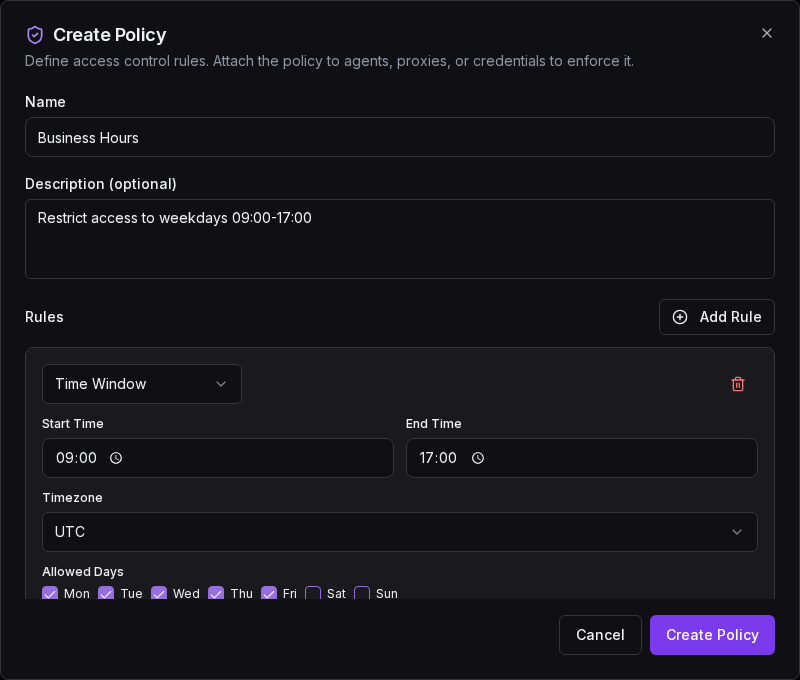
- Give it a name and optional description.
- Add one or more rules using the rule editor.
- Save the policy.
- Attach it to the entities you want to protect.
The create dialog lets you name your policy, add rules, and configure each rule's parameters:
Policies can be enabled or disabled without deleting them. A disabled policy is skipped during evaluation.
Managing Policies
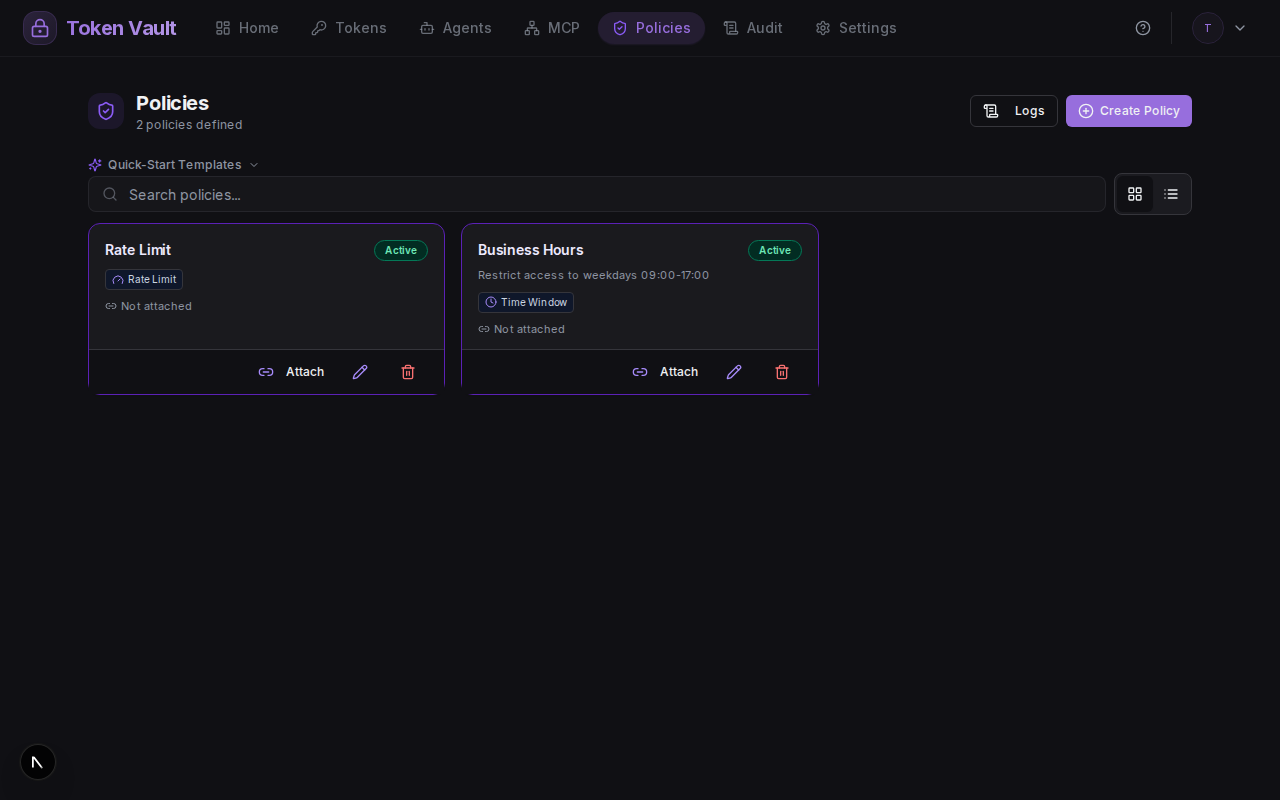
The Policies page shows all your policies with their rule counts and action buttons for editing, attaching, and deleting:
Attaching Policies
Policies are attached to entities - agents, MCP proxies, individual tokens, or Folders (a group of tokens). One policy can be attached to many entities, and one entity can have many policies.
Attaching a policy to a Folder applies it to every token currently in that Folder — checked at the moment each credential is requested, not fixed at attach time. Moving a token into the Folder makes the policy apply on its very next request; moving it out stops the policy just as immediately. This is enforced on every path that hands out a credential — REST and MCP agent fetches, the MCP proxy, and key/TOTP reveal — not just one of them.
To attach a policy:
- Open the Policies tab in the dashboard.
- Click the attach icon on the policy you want to use.
- Select the entity type (agent, proxy, or token) and pick the entity.
- The policy takes effect immediately - the next credential request will be evaluated against it.
To detach, open the same dialog and remove the attachment.
Example: Business Hours + Office IP
Create a policy with two rules:
| Rule | Configuration |
|---|---|
| Time window | Weekdays 09:00-17:00, Europe/London |
| IP allowlist | 203.0.113.0/24 (office network) |
Attach it to your GitHub agent. Now that agent can only retrieve GitHub credentials during business hours from the office network. A request at 22:00 or from a home IP is denied with:
403 POLICY_DENIED
Policy: "Business Hours"
Rule: time_window
Reason: "Current time 22:15 is outside allowed window 09:00-17:00"
Example: Rate-Limited, Geo-Fenced Proxy
Create a policy with two rules:
| Rule | Configuration |
|---|---|
| Rate limit | 50 requests per 300 seconds (5 min) |
| Geo restrict | Allow list of country codes |
Attach it to an MCP proxy. Requests from outside the allowed countries are refused with 403, and
if the proxy exceeds 50 requests in 5 minutes it is temporarily blocked with 429 regardless of
origin.
What Happens When Denied
When any rule fails, Token Vault returns:
{
  "error": "Access denied by policy",
  "policy": "Business Hours",
  "rule": "time_window",
  "reason": "Current time 22:15 is outside allowed window 09:00-17:00",
  "code": "POLICY_DENIED"
}{
"error": "Access denied by policy",
"policy": "5-Minute Budget",
"rule": "rate_limit",
"reason": "Rate limit exceeded: 50 requests per 5 minutes",
"code": "POLICY_DENIED",
"retryAfter": 128
}The response always includes the policy name (policy), rule type (rule), and a
human-readable reason so you can diagnose why access was blocked; a Rate Limit denial adds
retryAfter (seconds) and a matching Retry-After header. Denied requests are logged to your
audit trail.
The two MCP transports render a denial differently from each other, and from the REST shapes above:
/api/agents/mcp— every policy denial, Rate Limit included, is a JSON-RPC tool result (HTTP 200,isError: true,structuredContent.code: "POLICY_DENIED") rather than a transport-level error, since the policy check happens inside the tool call itself. See Tool errors and structuredContent./api/proxy/mcp— a Rate Limit denial is a JSON-RPC error (-32029, HTTP429); any other rule denies with the plain403body above, since this endpoint is a transparent proxy with no tool result to attach a non-rate-limit denial to. See Rate limiting and JSON-RPC error shape.
Schedules reach your own gateways too
time_window rules attached to an agent are also surfaced through OAuth token
introspection as an ambient authorization verdict — so an
MCP gateway you host can honor Token Vault schedules with a single HTTP call,
no policy engine required.
Ready to try it?
Sign up free with Google — your credentials stay on your own webhook, and the quickstart gets an agent fetching its first credential in about ten minutes.
Token Management
Add, manage, and refresh API keys, OAuth tokens, TOTP secrets, and raw credentials — all stored on your own webhook, brokered and audited by Token Vault.
Activity & Audit
Every credential access, agent request, policy decision, and config change — metadata in your dashboard, the full record on your webhook.